How to do a technical SEO audit on your website
How to do a technical SEO audit on your website
A great keyword and content strategy can help your organic performance, but you may still struggle to rank highly if your website has technical issues. This is why it’s important to regularly audit your website from a technical SEO perspective. In this blog we’ll talk through the steps to complete a top level technical SEO audit.
What is technical SEO?
Technical SEO is the process of improving a range of technical aspects of your site to improve your organic visibility in the search results. Google indexes pages based on a set of varying factors. Some of these factors include site speed, mobile-friendliness, number of broken links, depth of pages and quality of backlinks. If you make your website performant, fast, easy to find and easy to crawl, this will contribute to better rankings overall.
How to do a technical SEO audit on your site?
So where to start with a technical SEO audit? We would advise to follow the steps below, which can be done with a range of free tools easily accessible from the internet.
Do a crawl
The first thing we want to establish in a technical SEO audit, is that all the pages that should be indexed by Google, are being indexed by Google. The best way to find this out is to use a web crawling tool like Screaming Frog, which replicates what Google’s spiders do when they crawl your website. Simply download the tool, enter your website’s URL, and press ‘Start’.

The result of the crawl will give you a list of all the URLs on your website, their HTTP status (e.g. 200, 301, 404), if they are indexable, and if they are non-indexable, the reason why (redirect, canonical, blocked by robot.txt). At this stage you essentially want to ensure that all of your key pages are HTTP status 200 and indexable by Google.
If you encounter pages that are non-indexable, check their status and speak with your development team about getting these updated, submitted in Google Search Console and reindexed. Your sitemap will be valuable for getting pages indexed faster.
It is strongly advised to fix 404s as regularly as you can as having lots of broken links on your website is bad for the user experience, and is also a bad signal to Google about your website’s trustworthiness. Some CMS’s and monitoring tools allow you to set alerts for broken links, so you can keep on top of them and fix them at the earliest opportunity.
In the crawl file that you will have from Screaming Frog, you will also be able to see the meta title, meta description and H1 for every page on your site. This is also a great opportunity to check that all your key pages have optimised meta data and headers. For ideal character limits, your meta title should be around 69 characters long, your description 140-160 and your H1 can be as long as you like, but around 70 characters is about optimal on a page. The main thing to remember is that your H1 should clearly summarise what your page is about.
Make your site easy for Google bots to crawl
Essentially you want Google bots to be able to easily navigate and crawl your website. There may be some pages you want them to see and index, and there may be some pages that they can skip as they have no SEO value. So to save their time and make your website bot-friendly, write a robot.txt file. This is a text file that lists which pages the crawler is allowed to read and which pages to ignore (pages and files that are blocked). This file should always sit at the root of your domain and be called: https://www.yourdomainname.com/robots.txt.
Test your site speed
Site speed is one of the pillars of technical SEO. The longer your web pages take to load, the faster someone will click off your site, increasing your bounce rate. Ideally a page should load under two seconds. Every second longer than this will negatively impact your SEO performance.
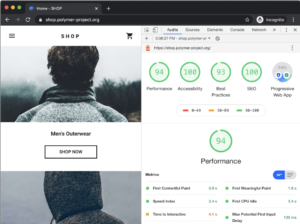
The best tool for this in our eyes is Google’s Lighthouse Developer’s tool, an open-source, automated tool to help improve the performance of your web pages. It can be found in the Chrome dev tools bar. To audit a page, simply visit that page, open to Lighthouse auditor, and select whether you want to test for desktop or mobile. We would recommend doing both.
(Source: https://developers.google.com/web/tools/lighthouse#devtools)
This tool will give you a list of areas where you will be scored out of 100, and based on your score in each area, you will be given recommendations on where to improve.
The great thing about the Lighthouse developers tool is that it now includes elements of Core Web Vitals, now an official ranking factor for Google, including first contentful paint, first meaningful paint and time to interactive. The recommendations for improvement are extensive and detailed, so can easily be handed over to a developer.
Make sure your website is optimised for mobile
Since Google moved to mobile-first indexing, having a website that is not only mobile-friendly, but actually optimised for mobile users, is a must. An easy way to check this is to go into your Google Search Console account and under the new ‘experience’ area, you can go to ‘mobile usability’. This will give you a list of pages that are mobile friendly, the trend over time, and it will notify you of any errors due to mobile usability.

Check your backlinks
The final area of your technical SEO audit should be your backlinks. Backlinks are external links on other websites that point to your website and your pages. If you have lots of backlinks, this is a good signal to Google, as if lots of people are referencing you, you must have something that is valuable and worth sharing, hence worth ranking highly.
However your backlinks must come from legitimate places. If you have a large number of links coming from spammy or untrustworthy sources, this could actually have a negative impact on your rankings. So it’s important to audit your backlinks, and look at the domains that are linking to you, and disavow any that look suspicious. This can be done through submitting a disavow list to Google Search Console. You can read more about backlinks and how to handle them in our backlinks guide.
So to summarise the above steps, the key points to do a technical SEO audit on your website are:
- Crawl your site
- Make sure all key pages are indexable
- Check for broken links
- Check your robot.txt file is correct and up to date
- Audit your site speed for desktop and mobile
- Check your mobile friendliness
- Audit your backlinks
For any questions or if you need support with your technical SEO, reach out to one of our team today.