What to measure in your SEO campaigns
Creating a great SEO strategy is one thing, but to make sure it’s working, you need to know how to measure performance. We’ve outlined some of the top metrics you should be checking, to measure the success of your SEO efforts.
Measure your search positions
In order to measure how your on page optimization efforts are paying off, you should set a benchmark for your current rankings.
There are a few different tools you can use to gather this information including Advanced Web Rankings, STAT, SEMRush and Ahrefs.
We recommend following this process to set up your rankings reporting:
- Define a list of top priority keywords that you want to track
- Assign to each keyword a preferred landing page (PLP) – this is the specific page on your website that you want to appear for each keyword
- Then with the help of a tool, report on how your content is ranking for your target keyword list
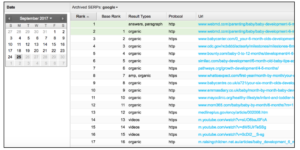
Getstat.com allows you to check the daily rankings of your target keywords
You should continue to monitor this month over month so you can identify drops or jumps. If a page experiences a drop in rankings over a continued period, you should check the top results in Google for that keyword, and look at reasons why this might have happened. Does your content need refreshing? Are there any new competitors targeting that keyword? Can you make any on-page improvements?
If you don’t notice an improvement after your on-page SEO optimisations, then something else might be holding the page back – perhaps you need to look at the site structure or internal linking practice to pass more authority to that page, maybe more competitors have started producing quality content, or you might need to build more external backlinks to your content .
Measure your traffic
Google Analytics is a great place to track traffic and traffic sources to your website. But you should also monitor your traffic on Google Search Console so you’re tracking how people are interacting with your results directly in the SERP.
Google Search Console offers us a level of insight that Google Analytic is unable to provide, giving us detailed information on the keywords that searchers use to find our site and the number of impressions our site has for specific search queries.
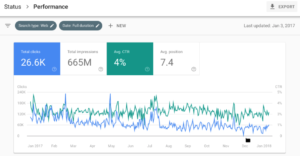
GSC lets you track performance based on interaction in the SERP
Google Search Console metrics
Impressions, clicks and average ranking position can be checked in Google Search Console. These are really valuable metrics as you can monitor how your pages are performing in the search results. All data from Google search console is based on interactions in the search engine results page. So if you see a drop in traffic on one platform, always check it on another to help identify where the drop may come from.
Click Through Rates
Click through rates are important, and although not an official ranking factor, there has been much discussion around the fact that high click through rates result in higher organic rankings. Whether or not Google uses CTR% in its ranking algorithm aside, it can’t be denied that click through rates are a key metric in your SEO efforts. There’s no point ranking in position one in Google if no one actually clicks through to your site. Optimised or missing meta titles and descriptions can impact your click through rates so make sure all your pages have well written and engaging meta content. Your CTR can be viewed in Google Search Console, and should be monitored on a weekly or monthly basis for your top priority pages.
There are many other factors that influence CTR. A search result might produce a featured snippet, for example, which answers a searcher’s question directly and doesn’t result in a click through to a site – known as a ‘Zero Click’ search. You might also look at other ways of improving CTR and standing out in search results, such as implementing product review schema to earn rich review snippets.
Bounce rates
When looking at your traffic, another important metric to consider is your bounce rate. A high bounce rate could mean that your content is not offering the user what they came looking for. If one of your pages experiences an uplift in traffic due to an improved position in the SERP, keep a close eye on your bounce rate to make sure that your content is relevant to the search terms it is ranking for, especially if you run an ecommerce business A high bounce rate may indicate to Google that your page isn’t the most appropriate for the search term, and could result in a drop in rankings. So where there are fluctuations in traffic, be sure to monitor your bounce rate. Any page with a low bounce rate could be a candidate for a content refresh and a meta content check.
On the other hand, there are some cases where a low bounce rate is not necessarily a bad sign. Let’s say you’re using a piece of content to answer a question on a product or service; if a user makes their way to that page from the search results and finds their answer easily on your site, there’s no need for them to look anywhere else. That may count as a bounce if they don’t navigate to another page or take an action on the page, but you’ve provided the best answer to their query. So it’s important to take the purpose and context of a page into account when looking at bounce rate metrics.
Measure your conversion rate
Getting increased traffic is great, but if those users are not actually converting on your site, they’re of little business value. Therefore you should be measuring your conversion rate (the proportion of people converting on your site) to ensure you’re bringing the right traffic.
To measure your conversion rate, you must first set up some goals and track them in Google Analytics or Google Tag Manager. For example goals could be someone filling out a form, signing up for a piece of gated content, or downloading a guide. Once you’ve defined your goals and set them up in your tracking tool, track the number of completed conversion actions in reference to your traffic. This will help you understand your average conversion rate per page.
Highly converting traffic means you have the right audience and they are engaged in your content. So monitoring your conversion rate is a powerful tool to track performance and measure ROI.
Measure your backlinks
You should keep on top of the quality of the external links pointing to your website as backlinks are an important ranking factor.
If you have a large number of backlinks from websites with a good domain score and high authority, this can improve your SEO profile compared to your competitors and rank higher in the SERPs. So make sure you’re consistently getting high authority, quality backlinks through an ethical and consistent link building campaign. If you’d like a step by step guide on how to do this, check out our blog on backlinks and how to get them.
As part of your backlink profile, you can also check your spam score. s. Your spam score is a reflection of how trustworthy your website is in the eye’s of the search engine. According to Moz, the “Spam Score represents the percentage of sites with similar features to the site you’re researching which we’ve found to be penalized or banned by Google’. Graded from 0 to 17, with 0 as the highest level of trustworthiness, you can check your website’s spam score on Moz’s Link Explorer.
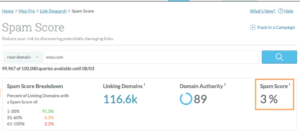
You can check your Spam Score with Moz’s link explorer tool
Some ways to improve your spam score include:
- avoiding ‘dodgy’ domain extensions (like .rest, .buzz instead of .com or .co.uk)
- making sure you have the right kind of pages (if your site only has a few pages, be sure to include an ‘about us’ or ‘contact’ us page, as this will make your site look more legitimate)
- using https instead of http (HTTPS uses the SSL/TLS protocol to encrypt communications so that attackers can’t steal data and is now considered the safe standard for all websites)
Contact our West Yorkshire based team on 0800 234 3977
Struggling to Get Your Site Ranking? Get in Touch. Need Help Boosting Your Authority? Read on...