Being able to manage your inventory on your e-commerce website is a fundamental part of running your online business. However the way stock is handled can post some threats to your SEO efforts. There are SEO friendly ways to handle out of stock products on your e-commerce site, and in this blog we’re going to show you how.
Strategies that don’t work and why they are problematic
Before we advise on E-Commerce SEO best practices, it is worth noting some of the most common ways of handling out of stock products and how they might damage your SEO efforts.
Deleting out of stock product pages
It may be tempting to delete an out of stock product page so you no longer have to manage it. However deleting a product page in most cases should only be a last resort. If you delete a product page every time an item goes out of stock, it can cause a bad user experience. Users might arrive on your web page from the search results and land on a 404.
If they have no alternative option or way to find what they are looking for, this might leave them frustrated. A 404 can also create a high bounce rate as users will click straight back to the organic search results page rather than staying on your site and looking for an alternative product to fill their needs.
Redirecting out of stock product pages to a category page or homepage
Another common practice and quick win for e-commerce companies is to implement a 301 redirect, redirecting users to a category page or homepage. The thinking is that if a product is no longer available, it makes sense to redirect them up a level to the category page or to the website’s homepage.
However this not only is disorienting for users, who expect to see a product and find themselves on a much less relevant page, but this is also confusing for Google. The search engine can take redirects of out of stock products as soft 404s – This can be damaging for SEO performance as it is considered bad practice.
The right way to handle out of stock products on e-commerce sites
There are some best practice rules around how to handle your inventory on your e-commerce site. This will all depend on the type of stock level e.g. temporarily out of stock or discontinued, and it will depend on the value that the page holds.
Keep the page live for temporarily out of stock products
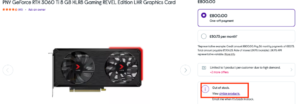
The best advice if your product is only temporarily out of stock is to keep the page live, but add a clear note to say that the item is temporarily out of stock. If you can advise a restock date, that is even better. You should also give the user an option to leave their email address so they can get notified when the item is back in stock.
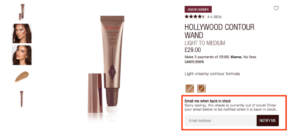
Suggesting similar alternative products below or alongside the out of stock products will also give the buyer the opportunity to purchase something else, staying on the site longer and helping your sales numbers.
One thing that will help your SEO performance is to use structured mark up on the page to notify Google that the product is out of stock. In fact, these three steps: leaving the page live, telling the user about alternatives and using structured data is advice that comes directly from Google back in 2018.
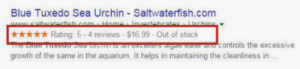
Example of out of stock schema markup (https://searchengineland.com/schema-markup-structured-data-seo-opportunities-site-type-231077)
Redirect the page if the product is discontinued but the page gets backlinks
There is one scenario where a 301 redirect is encouraged: this is when your product will be permanently out of stock e.g. discontinued, but has SEO value in terms of backlinks. These backlinks will be valuable to your SEO strategy, so you wouldn’t want to lose these with a 404. Instead, you should implement a 301 redirect, taking users to the next most relevant page or product.
However as mentioned above, be wary of redirecting users to category pages as this may frustrate potential buyers, increasing bounce rates, and may trick Google into thinking you have soft 404s.
Delete the page if the product is discontinued and the page gets no traffic
If your product page is discontinued but has very few conversions or backlinks, this is the one time you should implement a 404 and delete the page. You don’t want to end up with too many pages that are no longer needed on your website. This should only be for pages that have no SEO value and no commercial value to you.
Suggest similar or related products
SEO is all about the user experience and helping your customers find what they are looking for. In every scenario, it is always worth trying to point the users in the direction of similar or relevant alternatives. Whether you are using a 301 or 404, try to include a message about the product being out of stock but suggest similar or related alternatives.
Review your out of stock pages every few months
Hopefully this article has helped you to understand that how you handle your out of stock pages will depend on the type of page and how valuable it is. However this should be checked regularly. We would recommend reviewing your pages’ performance every few months, in case some pages lose value and their status should change. Otherwise you could end up with index-bloat: too many pages to index. This should be avoided as it increases your crawl budget and makes it harder for Google to find your good pages.